
Last Updated: April 11, 2026
XML Sitemap vs HTML Sitemap: An XML sitemap is designed for search engines to help them crawl and index your website efficiently, while an HTML sitemap is created for users to improve website navigation and user experience. Both are important for SEO, but they serve different purposes.
XML SiteMap Vs HTML SiteMap Which is Right for Your Website?
In the ever-evolving landscape of website optimization and search engine visibility, understanding the roles and benefits of XML Sitemaps and HTML Sitemaps is crucial.
In this blog post, we will take a closer look at:
- What is XML Site-Map
- Benefits of XML Site-Map
- What is HTML Site-Map
- Difference between XML SiteMap and HTML SiteMap
- How to Create and Submit Your SiteMap to Google Search Console
XML Site-Map XML Sitemaps: Guiding Search Engine Robots
What is an XML Sitemap?
Quick Answer: XML sitemap helps search engines index your pages.
An XML sitemap is a file created for search engines like Google to help them discover, crawl, and index important pages of your website. It acts as a roadmap that lists URLs along with additional metadata such as last update date and priority.
In simple terms, an XML sitemap tells search engines which pages are important and should be indexed.
Benefits of XML Site-Map”
- Helps search engines discover pages faster
- Improves indexing of new and updated content
- Useful for large or poorly linked websites
- Supports better crawl efficiency
HTML Sitemaps: Enhancing User Navigation
What is an HTML Sitemap?
An HTML sitemap is a user-friendly webpage that lists all important pages of your website in a structured format. It helps visitors easily find content when navigation menus fail.
In simple words, an HTML sitemap improves user experience by making your website easier to explore.
Benefits of HTML Sitemap
- Improves website navigation
- Enhances user experience
- Helps users find hidden pages
- Supports internal linking structure
Difference between XML SiteMap and HTML SiteMap
An XML sitemap is used by search engines to crawl and index website pages, while an HTML sitemap is designed for users to navigate a website easily. Both are important for SEO but serve different purposes.
Key Difference: XML sitemap is for search engines, while HTML sitemap is for users.
| Aspect | XML Sitemap | HTML Sitemap |
|---|---|---|
| Audience | Search Engines | Users |
| Purpose | Crawling & Indexing | Navigation |
| Format | XML File | Web Page |
| Visibility | Not visible to users | Visible |
| SEO Role | Helps indexing | Improves UX & internal linking |
Which is Better: XML Sitemap or HTML Sitemap?
Both XML and HTML sitemaps are important for SEO. XML sitemaps help search engines crawl your website efficiently, while HTML sitemaps improve user experience and navigation.
Best Practice: Use both XML and HTML sitemaps for maximum SEO benefit.
Final Answer: For best SEO results, use both XML and HTML sitemaps together.
How to Create XML SitemMap & Submit to Google Search Console
Watch Video If You Prefer to See Video :
How to create and submit your sitemap to Google Search Console (Non-Wordpress Website)
Before you upload sitemap to Google Search Console you need to do two important things:-
- Create you XML SiteMap File (2) upload your SiteMap.xml file to the roo directory of your website
And Last Step >>> Submit sitemap url to Google Search Console.1. Create your sitemap XML file>>>
Create your sitemap XML file through XML-sitemaps.com and download SiteMap.XML file to your Desktop.
Upload your sitemap.xml file to the root directory of your website.
Steps for upload sitemap.xml file to the root directory of website :-
Step a) login to C-Panel of your website
Step b) Click on File Manager

Step c) Double click on public_html

Step d) Click on Upload button and click “Select File”button and upload “Sitemap.XML”from your computer.

Steps for submit your sitemap to Google Search Console
- Sign in to Google Search Console.
- In the sidebar, select your website.

- Click on ‘Sitemaps’. You need to click on ‘Sitemaps’ menu is under the ‘Index’ section.

- Enter “sitemap.xml” in the ‘Add a new sitemap’ field to complete the sitemap URL.


- Click Submit.In conclusion, both XML and HTML Sitemaps are valuable tools in your website optimization arsenal. XML Sitemaps aid search engines in understanding your site’s structure, while HTML Sitemaps enhance user navigation and experience. By utilizing both, you can strike a balance between catering to search engines and providing a seamless experience for your visitors.Remember, as technology evolves, staying informed and adapting your strategies accordingly is key to maintaining a strong online presence.
Note:- For WordPress Websites: Using Yoast SEO Plugin
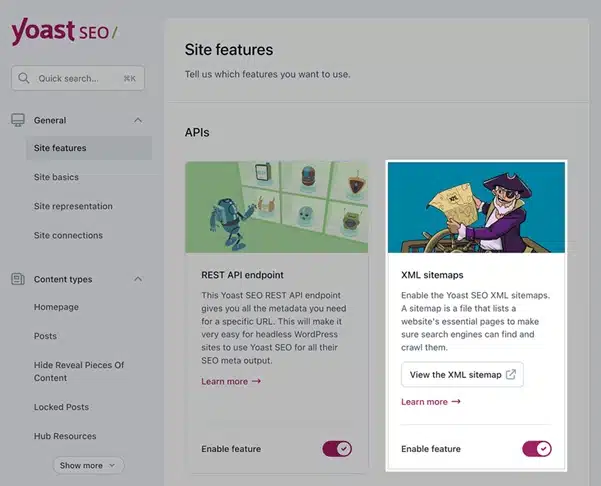
If your website uses WordPress with the Yoast SEO Plugin, it automatically creates an XML Sitemap. Enable the XML Sitemap feature in Yoast SEO plugin settings and click “View the XML sitemap”.

When you click “View the XML sitemap“, your sitemap opens in the browser. Copy the URL path (e.g.,
/sitemap_index.xml) and submit it in Google Search Console → Indexing → Sitemaps.Frequently Asked Questions
What is the difference between XML and HTML sitemap?
An XML sitemap helps search engines index pages, while an HTML sitemap helps users navigate the website.
Do I need both XML and HTML sitemap?
Yes, using both helps improve SEO and user experience.
Does an HTML sitemap help SEO?
Yes, it improves internal linking and user experience, which indirectly supports SEO.
Where should I submit XML sitemap?
You can submit your XML sitemap in Google Search Console under the Sitemaps section.