


If you check your website in Google Search Console, you may see a frustrating status:
“Crawled – Currently Not Indexed”
This means Google has visited your page but decided not to index it yet.
For many website owners and SEO professionals, this creates confusion:
- The page is published
- Googlebot crawled it
- But it still does not appear in search results
In this guide, you will learn:
- What “Crawled – Currently Not Indexed” means
- Why Google chooses not to index pages
- How to fix the issue step-by-step
- Technical SEO solutions that work in 2026
What Does “Crawled – Currently Not Indexed” Mean?
This status appears in Google Search Console → Pages → Why pages aren’t indexed.
If you check your website in Google Search Console, you may see a frustrating status:
“Crawled – Currently Not Indexed”
This means Google has visited your page but decided not to index it yet.
For many website owners and SEO professionals, this creates confusion:
- The page is published
- Googlebot crawled it
- But it still does not appear in search results
In this guide, you will learn:
- What “Crawled – Currently Not Indexed” means
- Why Google chooses not to index pages
- How to fix the issue step-by-step
- Technical SEO solutions that work in 2026
What Does “Crawled – Currently Not Indexed” Mean?
This status appears in Google Search Console → Pages → Why pages aren’t indexed.
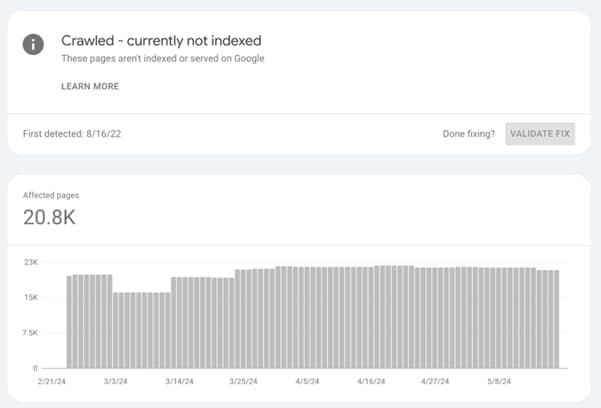

It means:
- Googlebot successfully crawled your page
- Google analyzed the content
- But Google decided not to add it to the index
This does NOT mean your page has an error.
It simply means Google believes the page is not valuable enough yet to be indexed.
Why Google Shows “Crawled – Currently Not Indexed”
There are several reasons Google may choose not to index a page.
- Thin or Low-Quality Content
If the page has very little information, Google may ignore it.
Example:
- 300–400 words
- Generic AI generated content
- No useful insights
Google prefers high-value content that solves user problems.
Fix
Improve the page by adding:
- Detailed explanations
- Original insights
- Case studies
- Images and diagrams
- FAQs
Your goal should be 1500+ helpful words.
- Duplicate or Similar Content
If Google already indexed a similar page on your site, it may ignore the new one.
Example:
example.com/seo-tips
example.com/seo-tips-2026
Both pages might contain similar content.
Fix
You can solve this by:
- Adding canonical tags
- Merging duplicate pages
- Improving unique content
Example canonical tag:
<link rel=”canonical” href=”https://example.com/seo-tips/”>
- Weak Internal Linking
Pages with poor internal linking often remain unindexed.
Google discovers page importance through internal links.
Example of poor linking:
- Page exists but no pages link to it
- Page is deeper than 4 clicks
Fix
Add internal links from:
- Homepage
- High traffic blog posts
- Category pages
Example:
Learn how to perform a complete Technical SEO audit in this guide.
- Low Website Authority
If your website has low authority, Google may crawl pages but delay indexing.
This is common for:
- New websites
- Websites with few backlinks
Fix
Build quality backlinks from:
- Industry blogs
- Guest posts
- Resource pages
- Digital PR campaigns
- Google Crawl Budget Optimization
Google may crawl many pages but only index those it considers important.
Sites with many pages often face this issue.
Example:
- Tag pages
- Archive pages
- Filter pages
- Parameter URLs
Fix
Improve crawl efficiency by:
- Removing low-quality pages
- Blocking unnecessary URLs in robots.txt
- Using canonical tags
Step-by-Step Process to Fix “Crawled – Currently Not Indexed”
Follow this simple process.
Step 1: Check the URL in Google Search Console
Open:
Google Search Console → URL Inspection Tool
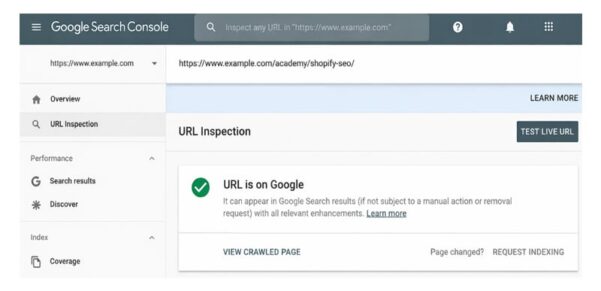


Paste your web-page URL
Check:
- Is the page crawlable?
- Is there a canonical issue?
- Is the page indexed already?
Step 2: Improve Content Quality
Google indexes pages that provide clear value to users.
Add:
- Detailed explanations
- Data
- Examples
- FAQs
- Images
A strong SEO article should include:
- Headings (H2 / H3)
- Tables
- Internal links
- Images
Step 3: Add Internal Links
Internal links help Google understand page importance.
Example structure:
Homepage
→ Blog category
→ SEO guide article
Good internal linking signals priority pages to Google.
Step 4: Improve Page Experience
Google also evaluates page experience.
Check using:
- Page Speed Insights
- Core Web Vitals
Key metrics:
- LCP under 2.5s
- CLS under 0.1
- INP under 200ms
Slow pages often struggle with indexing.
Step 5: Request Indexing
After fixing issues:
Open URL Inspection Tool → Request Indexing
This sends the page back to Google’s indexing queue.
Step 6: Build Backlinks to the Page
If Google still ignores the page, backlinks help.
Even 2–3 quality links can improve indexing.
Examples:
- Guest posts
- Industry directories
- Social sharing
How Long Does Indexing Take?
After fixing issues, indexing usually takes:
| Website Authority | Indexing Time |
| New website | 2–4 weeks |
| Medium authority site | 3–10 days |
| High authority site | 24–48 hours |
Pro Technical SEO Tips for Faster Indexing
Advanced SEOs use these techniques:
- Add Pages to Sitemap
https://example.com/sitemap.xml
Submit sitemap in Search Console.
- Improve Crawl Depth
Important pages should be within 3 clicks from homepage.
- Remove Low-Value Pages
Too many weak pages reduce indexing priority.
Remove:
- Tag pages
- Filter URLs
- Empty pages
- Use Structured Data
Add schema markup.
Example:
- Article schema
- FAQ schema
- Breadcrumb schema
This helps Google better understand content.
Final Thoughts
“Crawled – Currently Not Indexed” is one of the most common technical SEO issues.
The solution is not just requesting indexing again.
Instead, you should focus on:
- High-quality content
- Strong internal linking
- Technical SEO improvements
- Backlinks
- Better page experience
When these signals improve, Google usually indexes the page automatically.
Want to Master Technical SEO?
If you want to learn advanced technical SEO techniques used by professional SEOs, my book explains step-by-step.
It covers:
- Technical SEO audits
- Crawl budget optimization
- Indexing issues
- Website speed optimization
- AI-powered SEO strategies for 2026
This book is designed for:
- SEO professionals
- Website owners
- Digital marketers
- Agencies
👉 Learn Technical SEO the practical way and fix real SEO problems on your website.
FAQ: Crawled – Currently Not Indexed in Google Search Console
1. What does “Crawled – Currently Not Indexed” mean in Google Search Console?
“Crawled – Currently Not Indexed” means that Googlebot successfully visited your page but decided not to include it in the search index yet. This usually happens when Google believes the page does not provide enough value, has duplicate content, or is not important compared to other pages on the website.
2. Why does Google crawl my page but not index it?
Google may crawl a page but decide not to index it for several reasons, including:
Thin or low-quality content
Duplicate or similar content
Weak internal linking
Low website authority
Crawl budget limitations
Improving content quality and internal linking usually helps resolve the issue.
3. Is “Crawled – Currently Not Indexed” a technical SEO error?
No, it is not a technical error. It simply means Google has reviewed the page but has not yet decided to add it to the search index. However, if many pages on your website show this status, it may indicate content quality or crawl budget issues.
4. How can I fix “Crawled – Currently Not Indexed”?
You can fix this issue by improving the overall quality and SEO signals of the page. The most effective solutions include:
Expanding the content with useful information
Adding internal links from important pages
Building backlinks to the page
Improving page speed and user experience
Requesting indexing through Google Search Console
5. How long does it take Google to index a page after fixing the issue?
The indexing time depends on the authority of your website.
New websites: 2–4 weeks
Medium authority websites: 3–10 days
High authority websites: 24–48 hours
Submitting the URL for indexing in Google Search Console can sometimes speed up the process.
6. Can internal linking help fix “Crawled – Currently Not Indexed”?
Yes. Internal linking is one of the most effective ways to help Google understand the importance of a page. When important pages such as the homepage or high-traffic articles link to a page, Google is more likely to prioritize it for indexing.
7. Does low-quality content cause indexing issues?
Yes. Pages with thin content, generic AI-generated text, or little useful information often remain unindexed. Google prefers pages that provide detailed explanations, original insights, examples, and helpful resources for users.
👉 Free SEO Audit
👉 Freelance SEO Expert in Delhi
About Author
Kashif Rehman — Online Digital Marketing, Freelance WordPress Website Designer, Google Ads, Facebook Ads, SEO Teacher & Expert in Delhi, India.
About Author

I’m Kashif Rehman, an online digital marketing teacher SEO Expert , and freelance digital marketing professional in Delhi with over 6+ years of hands-on experience in helping individuals, entrepreneurs, and working professionals master digital marketing through 1-on-1 live digital marketing coaching.

