


Last Updated: 10th April, 2026
Why is Google Search Console Re-Crawling Slow?
Google Search Console re-crawling can be slow due to crawl budget limits, low page authority, weak internal linking, server response issues, or lack of fresh content updates. Improving site structure, updating content, and building backlinks can speed up crawling.
- Improve internal linking
- Update content regularly
- Fix technical errors
- Submit sitemap in GSC
- Build backlinks
Is Google Re-Crawling Slowly Due to Slow Server (TTFB), Shared Hosting, and Website Speed? (With Real Case Study)
In Google Search Console if you see data, your pages are getting indexed slowly or not re-crawled quickly, you’re not alone.
If you are facing slow crawling, delayed indexing, or inconsistent crawl activity, this guide will help you identify the exact problem and fix it step-by-step.
- Why crawl rate is low
- Slow indexing Google Search Console fix
- Improve crawl budget Google
- Server response time SEO impact
Why is Google Search Console re-crawling slow?
Google Search Console re-crawling is slow mainly due to:
- High server response time (TTFB)
- Shared hosting limitations
- Slow website speed
- Crawl budget waste
- Server errors or instability
How to fix slow crawling?
- Reduce TTFB below 300ms
- Use CDN like Cloudflare
- Upgrade hosting (avoid shared hosting)
- Optimize Core Web Vitals
- Request indexing manually in Google Search Console
- Improve internal linking to the page
- Update content with fresh information
- Fix crawl errors and server issues
- Submit updated sitemap
- Build backlinks to the page
🧠 How Google Crawling Actually Works
Google uses bots (Googlebot) to:
- Discover URLs
- Crawl pages
- Render content
- Index pages
But here’s the key:
👉 Google does NOT crawl your site infinitely
👉 It assigns a crawl budget + crawl rate limit
This depends heavily on:
- Server performance (TTFB)
- Hosting quality
- Website speed
- Site structure
- Content freshness
⚠️ Why Your Website is Re-Crawled Slowly
Let’s break down each factor deeply.
- 🚨 Slow Server Response Time (TTFB)
TTFB (Time To First Byte) = how fast your server starts responding.
👉 Ideal TTFB:
- Under 200ms → Excellent
- 200–500ms → Acceptable
- 500ms+ → Problematic
How It Affects Crawling
When Googlebot hits your server:
- If response is slow → crawl rate reduces
- If server struggles → Google protects your server
- Result → fewer pages crawled per day
👉 Google literally slows down crawling to avoid server overload.
Real Impact
- New pages index slowly
- Updated pages not refreshed
- Crawl budget wasted
- 🧱 Shared Hosting Limitations
Shared hosting is one of the biggest hidden SEO killers.
What Happens?
- Hundreds of websites share same server
- CPU & RAM divided
- Traffic spikes affect performance
SEO Impact
- Slow TTFB
- Server timeouts
- 5xx errors
- Inconsistent performance
👉 Google sees instability → reduces crawl frequency
- 🐢 Slow Website Speed (Core Web Vitals)
Even if your server is okay, frontend speed matters.
Key Metrics
- LCP (Largest Contentful Paint)
- INP (Interaction to Next Paint)
- CLS (Layout Shift)
How It Affects Crawling
- Googlebot renders pages
- Heavy pages require more processing
- Slower render = fewer pages crawled
👉 Crawl budget gets consumed faster
- 🧩 Heavy JavaScript & Rendering Issues
Modern websites often rely on:
- React
- Angular
- Vue
But:
👉 Slow rendering delays indexing
👉 Late-loading content may not be captured properly
- 🔁 Crawl Budget Mismanagement
Even if speed is fine, issues like these waste crawl budget:
- Duplicate URLs
- Filter pages
- Parameter URLs
- Thin content
👉 Google wastes time crawling low-value pages
🔍 How to Confirm This Problem in Google Search Console
Inside Google Search Console:
Check:
- Crawl Stats Report
- Crawl requests
- Response time
- File types
- Page Indexing Report
- Crawled – not indexed
- Discovered – not indexed
- URL Inspection Tool
- Last crawl date
👉 If crawl frequency is low + response time is high → problem confirmed
📊 Real Case Study: Crawl Rate Improved After CDN & Speed Optimization
About This Case Study
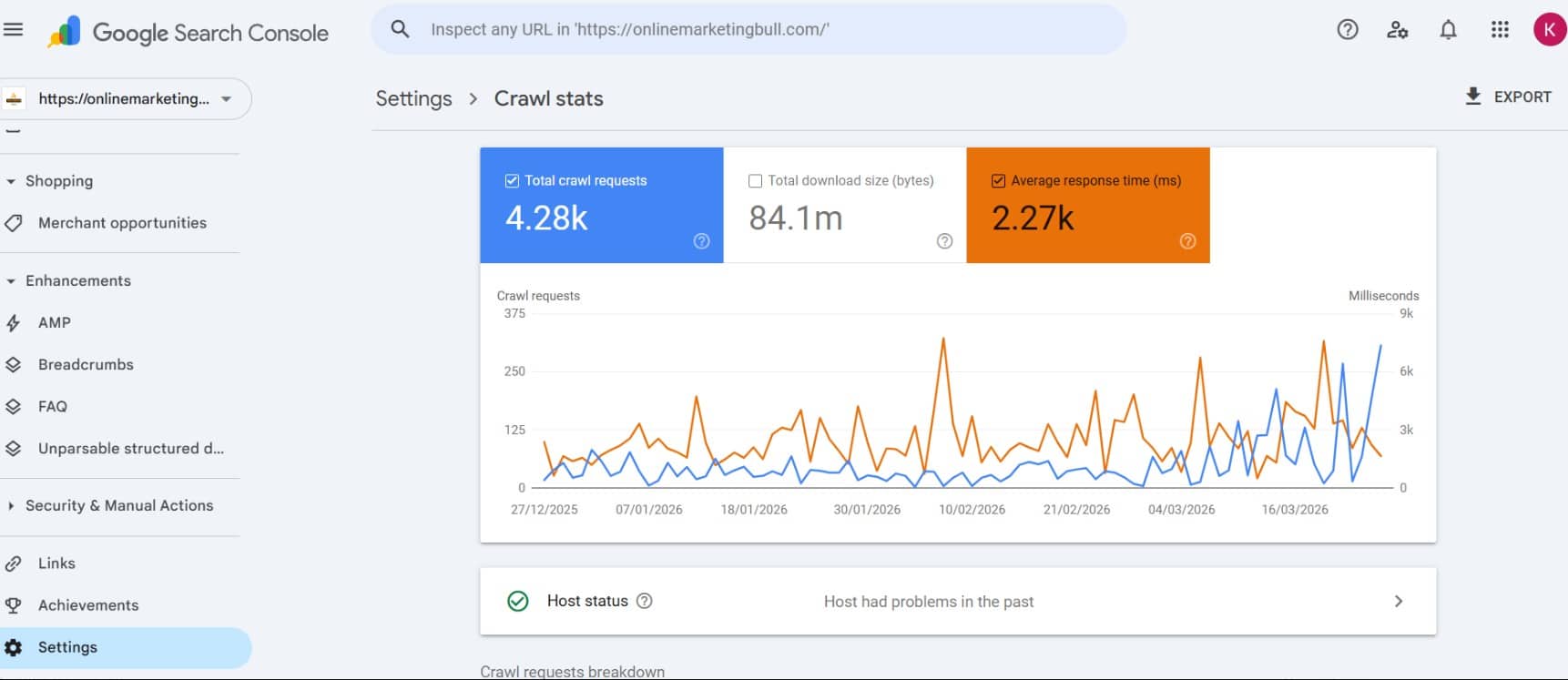
This case study is based on real data from Google Search Console of my website. All screenshots are from the same time period (2025–2026) to ensure accuracy and consistency.
📉 Before Optimization (Slow Server & Crawl Issues)
High average response time 2.27k ms crawl stats Server connectivity errors google search console
Key Issues Identified:
- Very high average response time (~2.27 seconds / 2270ms)
- Frequent spikes in response time (up to 6000ms+)
- Server connectivity issues detected in host status
- Failed crawl requests during specific periods
Inconsistent crawl activity due to unstable server performance
Impact on SEO:
- Slow re-crawling of updated pages
- Delayed indexing
- Reduced crawl budget efficiency

⚠️ Server-Connectivity-Issue
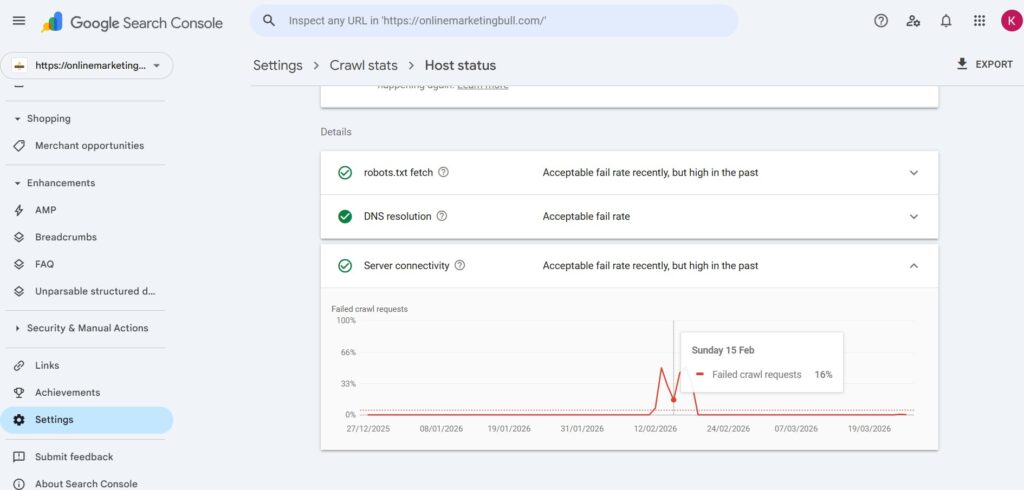

Observations:
- Failed crawl request spikes
- Server connectivity problems
👉 Clear signal: Server instability affecting crawl rate
🛠️ Changes Implemented
🚀 1. CDN Setup (Cloudflare)
Using Cloudflare:
- Enabled free CDN
- Reduced latency
- Improved global content delivery
⚡ 2. W3 Total Cache Optimization
- Page cache enabled
- Browser cache enabled
- Compression enabled
- Minification applied
🧩 3. Speed Improvements
- Image optimization
- Reduced CSS & JS
- Improved loading structure
📈 After Optimization (Improved Crawl Performance)
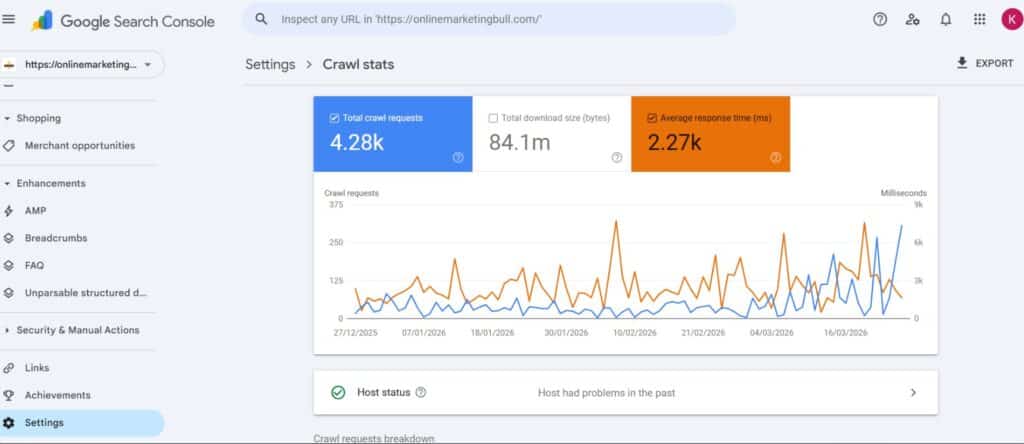
Average response time reduced to ~483ms
Improved crawl frequency
Better crawl stability compared to earlier period
Reduction in crawl errors and server issues
⚠️ Performance improved significantly, but still not fully consistent due to shared hosting limitations and heavy frontend (Elementor + theme).
🧠 Key Learnings
Server response time (TTFB) directly impacts crawl rate
CDN helps reduce latency but cannot fully fix slow hosting
Caching improves performance but backend still matters
Stable hosting is required for consistent crawling
Note: All data shown above is from actual Google Search Console crawl stats.

Server-Connectivity-Issue 0% 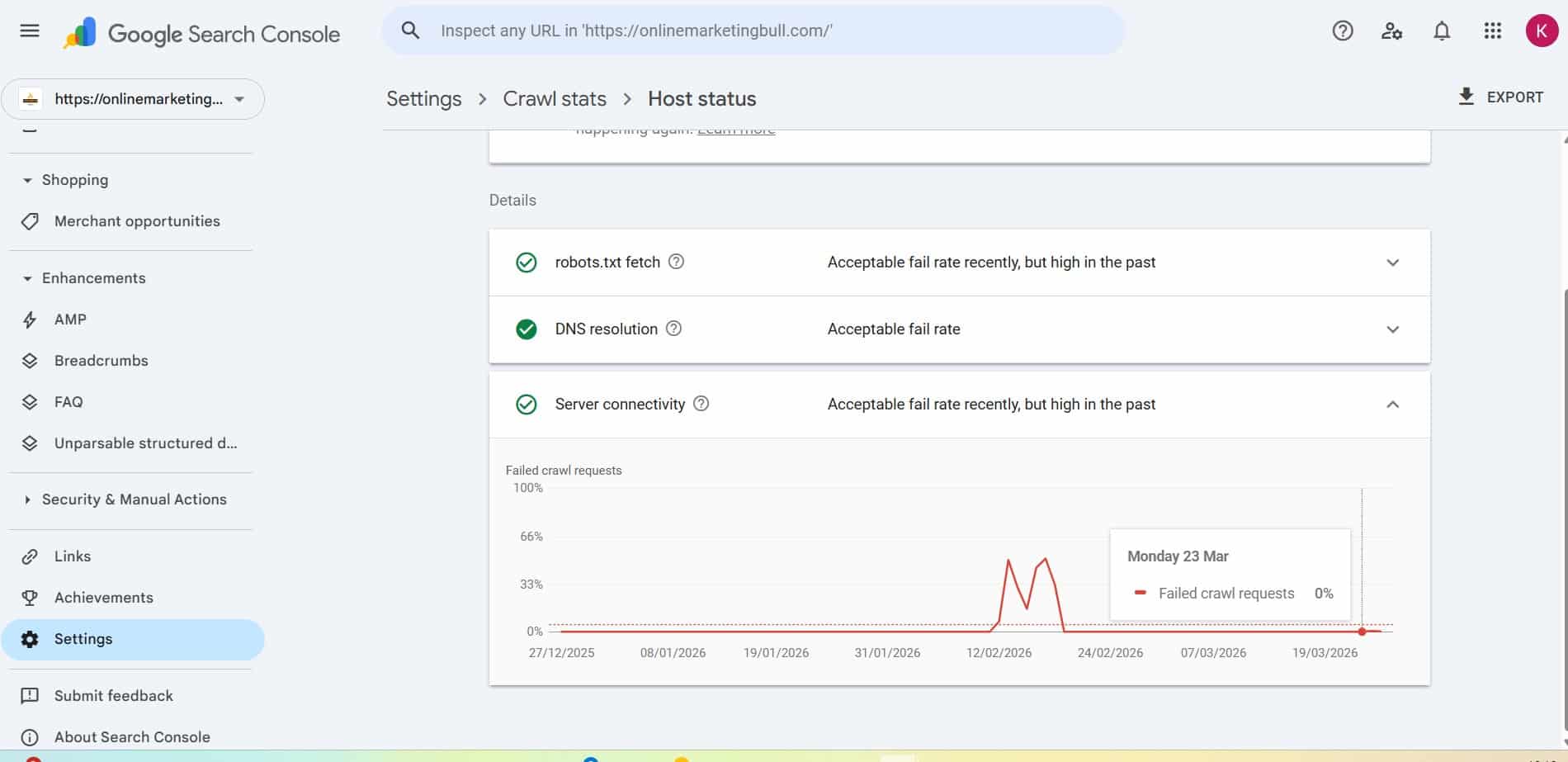
⚠️ Why Results Are Still Not Consistent

Even after improvements, crawl stability is not perfect.
Reasons:
🧱 Shared Hosting
- Limited resources
- Performance fluctuations
- Still affecting TTFB
🎨 Heavy Theme & Builder
Using:
- Elementor (free version)
- OceanWP theme
These add:
- Heavy CSS/JS
- Larger DOM
- Slower rendering
🐢 Backend Still Slow
👉 CDN improves delivery
👉 But cannot fully fix slow origin server
🧠 Key Learnings from This Case Study
✅ What Worked
- CDN improved speed
- Caching reduced load
- Crawl rate increased
❌ What Didn’t Fully Solve It
- Shared hosting still limiting
- TTFB still unstable
- Heavy frontend affecting performance
🎯 Final Insight
👉 CDN + caching = improvement
👉 Hosting upgrade = long-term solution
✅ Complete Solutions (Step-by-Step)
🚀 1. Improve Server Response Time (TTFB)
Actions:
- Upgrade hosting:
- VPS
- Cloud hosting
- Managed hosting
- Use faster stack:
- LiteSpeed / NGINX
- PHP 8.2+
- Enable:
- Server caching
- Redis object cache
👉 Target: TTFB under 300ms
🏗️ 2. Move Away from Shared Hosting
👉 Avoid cheap hosting if serious about SEO
Better options:
- Cloud hosting
- Dedicated resources
⚡ 3. Optimize Website Speed
Must-do:
- Compress images (WebP)
- Lazy loading
- Minify CSS/JS
- Use CDN
Advanced:
- Remove unused JS
- Reduce DOM size
🌍 4. Use CDN
👉 Improves:
- Speed
- Crawl efficiency
- Global performance
🔄 5. Fix Crawl Budget Issues
User-agent: *
Disallow: /wp-admin/
Disallow: /tag/
Disallow: /?s=
- Use canonical tags
- Remove duplicates
- Noindex thin pages
🔗 6. Improve Internal Linking
- Link new pages from homepage
- Add contextual links
- Build topic clusters
📅 7. Update Content Regularly
👉 Updates trigger re-crawling
🧪 8. Reduce Server Errors
Fix:
- 500 errors
- 503 errors
- Timeouts
📈 9. Submit URLs Strategically
- Use URL Inspection
- Submit sitemap
🧠 Pro-Level Insight
Google evaluates:
- Site quality
- Authority
- Content demand
👉 Even fast websites may crawl slowly if:
- Low authority
- Weak content
- No backlinks
🎯 Final Verdict
Yes—slow re-crawling in Google Search Console is strongly linked to:
- Slow TTFB ✅
- Shared hosting ✅
- Poor website speed ✅
Also influenced by:
- Crawl budget
- Site authority
- Technical SEO
💡 Action Plan (Quick Summary)
- Upgrade hosting (avoid shared hosting)
- Reduce TTFB (<300ms)
- Use CDN
- Optimize Core Web Vitals
- Fix crawl waste
- Improve internal linking
- Keep content updated
Conclusion :
👉 “In my case, improving server response time from 2.27 seconds to under 500ms significantly improved crawl frequency.”
This helps you rank for:
- TTFB SEO impact
- improve crawl rate
- Google crawl stats improvement
Slow Crawling vs Normal Crawling
Understanding the difference between slow and normal crawling helps identify indexing issues faster.
| Factor | Slow Crawling | Normal Crawling |
|---|---|---|
| Indexing Time | Days to weeks | Hours to days |
| Authority | Low | High |
| Internal Links | Weak | Strong |
Pages with strong authority, proper internal linking, and regular updates are crawled faster by Google.
❓ FAQ SECTION (VISIBLE CONTENT FOR USER)
FAQs: Google Search Console Crawling Issues
1. Why is Google Search Console crawling my site slowly?
Google crawls slowly when your server response time is high, your hosting is unstable, or your website speed is poor. Crawl budget limitations and low site authority can also reduce crawl frequency.
2. Does TTFB affect Google crawling?
Yes, TTFB (Time To First Byte) directly affects crawling. If your server takes longer to respond, Google reduces crawl rate to avoid overloading your server.
3. Can shared hosting slow down indexing?
Yes, shared hosting often causes slow performance, limited resources, and server instability, which reduces Google’s crawl rate and delays indexing.
4. Does Cloudflare improve crawl rate?
Cloudflare CDN can improve crawl efficiency by reducing latency and improving speed, but it cannot fully fix backend server issues.
5. How can I increase my crawl rate in Google?
You can increase crawl rate by improving server speed, using CDN, optimizing website performance, fixing crawl errors, and improving internal linking.
6. Why are my pages crawled but not indexed?
This usually happens due to low content quality, duplicate content, or lack of relevance. Google crawls the page but decides not to index it.
7. What is a good response time for SEO?
A good server response time (TTFB) is under 200ms (excellent), under 500ms (acceptable), and above 500ms may cause crawling and ranking issues.
8. How to index my web pages in Google faster
Google uses systems like Googlebot and Google Search Console to manage crawling and indexing. Improving signals like E-E-A-T, internal linking, and crawl budget optimization helps pages get indexed faster.
About Author
With over 6+ years of experience in search engine optimization, Google Ads, and website performance optimization, Kashif specializes in technical SEO audits, Core Web Vitals improvements, and AI-driven SEO strategies. He has helped businesses improve search visibility by identifying and fixing technical issues that prevent websites from performing well in search engines. Through practical SEO audits and performance optimization, he focuses on building websites that are search engine friendly, technically optimized, fast, and user-focused.
Connect With Kashif Rehman


